Date a migration backwards from end of support
Your plan is dated from the one day nobody on the project can move.
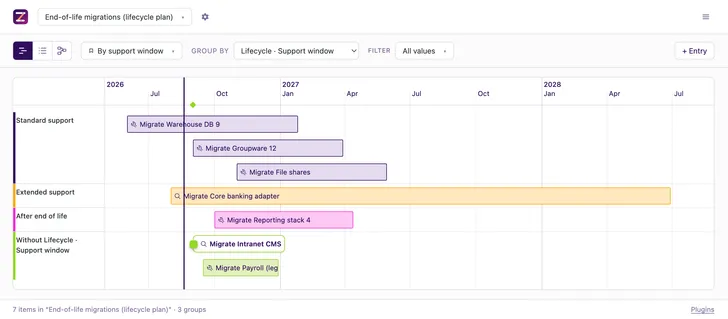
End-of-life migration planning on a dated plan
Lifecycle is a plugin for Zeitlines, a self-hosted planning tool, for teams migrating off a system a vendor is about to stop supporting. Type each system's end-of-support date. The plan then carries the latest day work can still start, a cutover that avoids your change freezes, and a parallel run that keeps its minimum. Portfolio tools like SAP LeanIX rate lifecycle risk across a whole application estate, from an inventory they keep for you. This starts from the dates you type, on a timeline you already have.
See which systems are already late
Group the timeline by support window. The plans whose shutdown falls past their own end of life stand in a lane of their own.
Get the last day you can still start
Read the latest start off every system: its deadline minus its own lead time. The plugin fills it in, and keeps no copy of it.
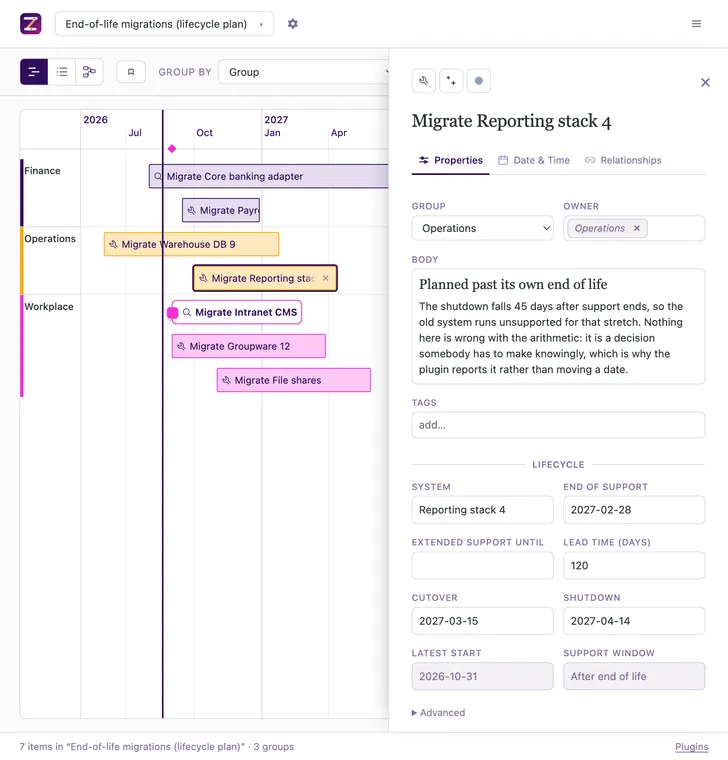
Keep the cutover out of your freeze windows
Declare a year-end freeze or a peak season once, for the whole timeline. Ask your agent to move a blocked cutover, and it names what the move costs.
Keep the parallel run you decided on
Set the shortest parallel run the plan may have. A plan that drops under it is reported with the days it is short.
Send an agent at the whole plan
Ask for the lifecycle risk over MCP. The answer names the plans that do not hold, and the ones it cannot judge.
How to use
- Switch Lifecycle on under the timeline's settings → Plugins.
- Set a minimum parallel run and a default lead time, over MCP or in the timeline file.
- Type each system's end-of-support date, then have your agent date the cutover.
- Status
- In the repository
- Works with
- Filesystem Database
- Documentation
- src/plugins/lifecycle/README.md
Frequently asked questions
- How much lead time before end of life do we need?
- Whatever you set. Zeitlines ships no default, because the sources disagree by an order of magnitude: two weeks at one end, a full business year at the other. A timeline carries a default lead time and any system can override it.
- What is the latest we can start and still make the deadline?
- End of support minus that system’s lead time. Every item shows it, recomputed on every build rather than stored, so an edited date leaves no stale answer behind. Bought extended support moves it out.
- What is the difference between end of life, end of support and extended support?
- Nothing here defines them for you. Neither term has a universal industry definition, so what a vendor still provides has to be confirmed per vendor. The plugin takes both dates as input and derives neither from the other.
- How long should the parallel run be before we switch the old system off?
- At least the minimum you configure, and there is no default for that either. Without one, the cutover and risk verbs report that they cannot answer instead of assuming a number. A run under the minimum is reported with the days it is short.
- What do we do when the cutover lands in a change freeze?
- Move the cutover; the shutdown stays on the vendor’s date. Dating a plan moves a blocked cutover earlier, which lengthens the parallel run. Only the cutover day is checked against a freeze, not the whole stretch to the shutdown.
Sources
Each statement describes documented behaviour, read on 2026-08-18.