For people
Explore and shape the plan.
Work visually across timelines, lists, graphs and plugin-specific views. Every change stays connected to the same planning source.
Zeitlines turns your data into timelines where people and agents work on the same plan.
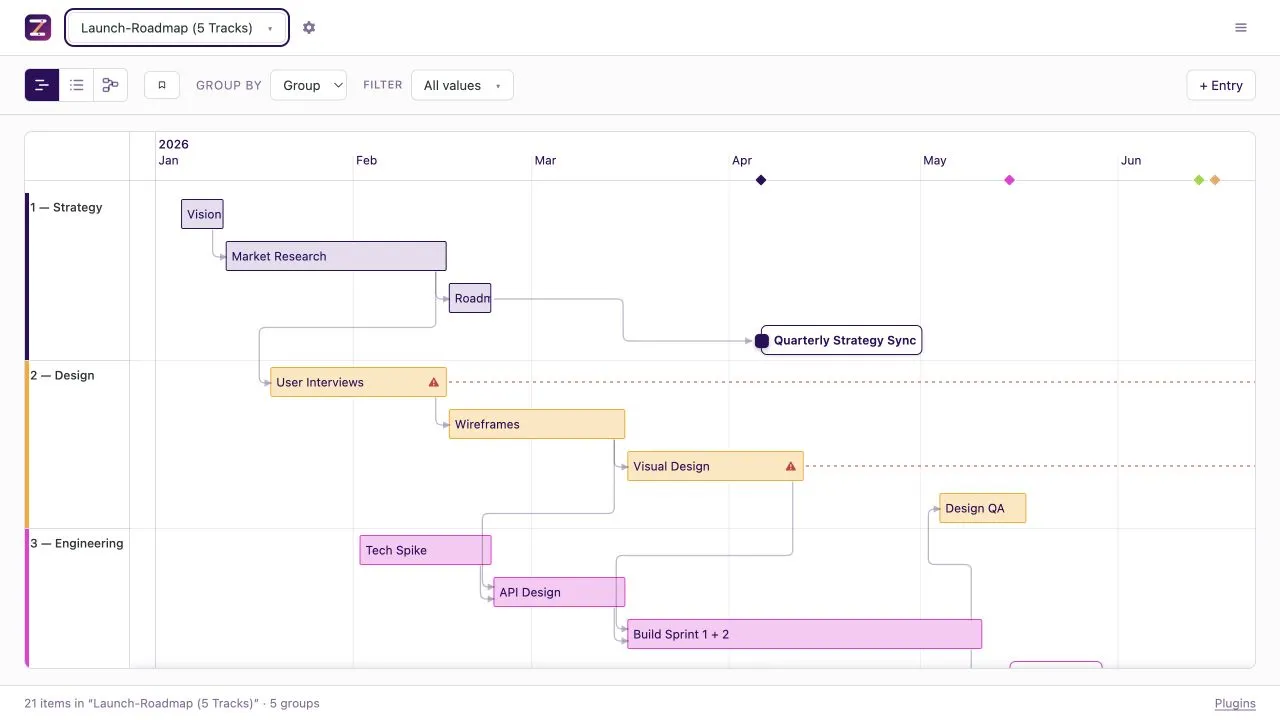
People explore and edit the plan in the browser. Agents read and change the live records through MCP. Both work with items, groups, dates and dependencies that stay visible to the other.
See how agents work with ZeitlinesFor people
Work visually across timelines, lists, graphs and plugin-specific views. Every change stays connected to the same planning source.
For agents
Strategy and roadmap live in the same structured plan, with intent, sequence, dependencies and commitments made explicit. Agents use that context and domain-specific tools to keep it current.
Zeitlines reads JSON, Markdown and Postgres directly. Your source remains the place where the plan lives.
JSONKeep a portable plan beside the work it describes.
MarkdownTurn dated notes and their frontmatter into timeline items.
PostgresKeep a deployed plan editable for people and agents.
A view is a way into the plan. The underlying records stay the same as you move between them.
See dates, phases, milestones and dependencies in context.
Scan the same records as a compact, sortable working set.
Follow dependencies and relationships across the plan.
Open focused interfaces for the domain the plan serves.
Plugins add fields, views, stored data and agent tools while the core stays focused on records and relationships.
Choose a local file workflow or a shared Postgres deployment. Both use the same application and view model.
Run Zeitlines beside JSON or Markdown. The local development server can write changes back to those files.
Connect Postgres for a shared plan that stays editable after deployment and can be reached through remote MCP.
Clone the repository, install the dependencies and start Zeitlines with the example data included.
git clone https://github.com/zeitlines/zeitlines.git
cd zeitlines
npm install
npm run dev